
aftables version 2.1.0 is now available

We’re excited to announce that aftables version 2.1.0 is now available! aftables is an R package for creating accessible spreadsheets. aftables implements the Analysis Function guidance for releasing statistics in spreadsheets. For an introduction to the package see our previous aftables blog post.
About aftables
aftables automates text formatting and layout of spreadsheets to meet accessibility requirements.
aftables was developed by Matt Dray. It is maintained by the Government Statistical Service (GSS) Presentation Champions Network.
How to install aftables
aftables is available to be installed from the Comprehensive R Archive Network (CRAN):
install.packages(‘aftables’)
How to use aftables
The main functions in the aftables package are
- create_aftable()
- generate_workbook()
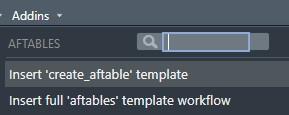
The create_aftable() function generates an aftable dataframe containing all the information needed to create a workbook. It is then passed to generate_workbook() which creates an openxlsx2 wbWorkbook object which can be passed into the openxlsx2::wb_save() function. aftables adds workflow templates as RStudio addins to simplify adding aftables to existing projects.
Figure 1: Screenshot showing workflow templates in the RStudio addins menu
What has changed in aftables version 2.1.0
aftables has been upgraded to use the openxlsx2 package to create Excel workbooks. This upgrade enables aftables to set document properties (such as author and title) by using new arguments in the generate_workbook() function, as recommended in the Analysis Function guidance. aftables has also improved formatting of numeric columns, with better handling of shorthand text and numbers in the same column, and thousand separators by default. The new number_formatter function enables users to specify decimal places and use of thousand separators on a per-column basis. aftables now supports yaml configuration files for detailed control of document properties, workbook text formatting and column widths.
Upgrade to openxlsx2
The change of packages from openxlsx to openxlsx2 requires a small change to how the workbook object created by the generate_workbook function is exported from R. In aftables v1.0.2, workbook objects could be exported with the openxlsx::save_workbook() function. Users should be aware that after updating to aftables v2.1.0 they will need to change their code to use the openxlsx2::wb_save() function to create the Excel file from the workbook object created using aftables. This change will also require updating any additional code to use openxlsx2 functions to modify the workbook object after it is created by aftables. The openxlsx2 package provides functions similar to those from the openxlsx package so we expect these updates to be minor.
Workbook properties
aftables currently supports setting the following workbook properties:
- Author
- Title
- Keywords or Tags
- Subject
- Category
- Comments
The aftables generate_workbook() function has three new arguments which can be used to set document properties: author, title, and keywords. The Analysis Function guidance recommends author, title and keywords properties are completed as a minimum. The minimum recommended properties can be set by providing values to the author, title, and keyword arguments. If the minimum recommended properties are not provided aftables will warn the user but will not prevent creation of workbooks.
The following code demonstrates how to set document properties using the demo_aftable from aftables:
example_workbook <- generate_workbook(
demo_aftable,
author = “Example author”,
title = “example workbook”,
keywords = c(“keyword1”, “keyword2”, “keyword3”)
)
aftables also optionally supports using a yaml configuration file as a more flexible method for setting workbook properties. Use of a configuration file is an alternative method to set the author, title and keywords fields, and additionally enables setting subject, category and comments fields. More detail on the use of configuration files with aftables can be found in the configuration files vignette.
This new feature implements the “Document information” section of the Analysis Function guidance for releasing statistics in spreadsheets. Please see the guidance for more information about what each field should contain.
aftables does not currently support setting document language, and so users should follow the instructions to set document language in the Analysis Function guidance.
Improved default number formatting and new number_formatter function
The aftables v2.0 release also fixed issues which were causing users to have to make manual changes to data tables in workbooks after using aftables. Numbers in columns which also contain text were not being formatted properly, and large numbers did not have thousand separators by default.
Analysis Function guidance allows for shorthand in table cells which would otherwise be empty. The shorthand is used to provide information to the reader why the cell is empty. There was a bug in aftables v1.0.2 which prevented numeric data in columns which also contained shorthand from being formatted properly.
The bug was caused by differences in the way R and Excel process columns containing mixed numeric and text values. R has a single data type per column and so treats numbers in mixed columns as text. Excel treats numbers or currency in these columns as text, and formats them as such. This causes a warning to appear in each cell. Numeric data appearing as text also does not have appropriate and consistent formatting for decimal places.
aftables now applies custom number or currency formatting based on the users’ data. This causes Excel to correctly recognise numbers and currencies as numeric data which avoids causing the previous warning, and formats them with consistent decimal places. Applying the custom number and currency formatting also enabled aftables to add thousand separators by default to all numbers.
This can be seen when comparing a data table produced by aftables v1.0.2 and the same data table produced by aftables v2.1.0.
Figure 2: Screenshot of a spreadsheet created using aftables v1.0.2
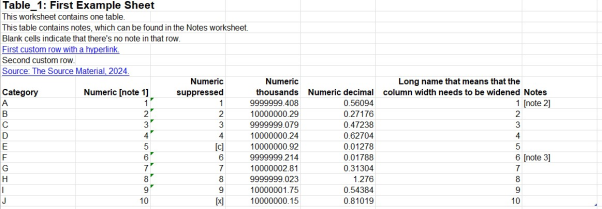
Figure 3: Screenshot of a spreadsheet created using aftables v2.1.0
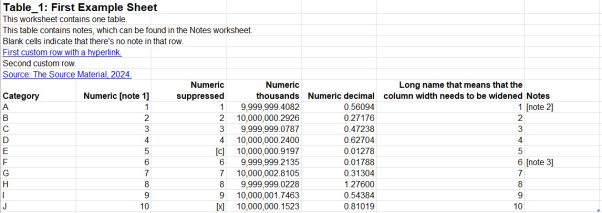
In v2.1.0, the numbers in the “Numeric suppressed” column are treated as numeric without an Excel warning. The numbers in the “Numeric thousands” column have thousand separators. The numbers in the “Numeric thousands” and “Numeric decimal” columns have consistent numbers of decimal places.
The number_formatter function enables users to overrule this new default behaviour by setting the number of decimal places and whether to display thousand separators. This example code demonstrates how to remove thousand separators from columns containing dates as years, and to limit the number of decimal places displayed for a percentage to 2:
library(dplyr)
set.seed(1066)
table_1_df <- data.frame(
Category = LETTERS[1:10],
Date = 2001:2010,
Date2 = 2001:2010,
“Count” = abs(round(rnorm(10), 3) * 1e3),
“Population” = abs(round(rnorm(10), 5) * 1e5),
check.names = FALSE
) |>
mutate(Percentage = Count/Population * 100)
# Specify removing thousand separators for Date and Date2 columns
table_1_df_formatted <- table_1_df |>
number_formatter(
columns = c(Date, Date2),
thousand_separators = FALSE
)
# Display only 2 decimal places of Percentage column
table_1_df_formatted_2dp <- table_1_df |>
number_formatter(
columns = “Percentage”,
decimal_places = 2
)
Adding workbook formatting
Another new feature of aftables is control over workbook formatting which is only available when using a configuration file. aftables currently supports setting the following workbook formatting:
- Font name
- Font sizes
- Column widths
More detail on the use of configuration files with aftables can be found in the configuration files vignette.
aftables workflows in the Addins menu
aftables is intended for use with existing projects which produce data tables for publication in Excel spreadsheets. aftables includes examples of two workflows to simplify integrating aftables into existing projects and makes them available as RStudio addins. These addins generate template code for the workflows and provide a ready-made starting point for creating accessible spreadsheets with aftables. Use the Addins menu in RStudio to insert the aftables workflow templates into existing projects.
Feedback and support
If you notice anything wrong with aftables or have a suggestion for a new feature please raise an issue on the aftables GitHub page.
If you’re a member of the Analysis Function and would like to join the aftables development team, please contact the GSS Presentation Champions Network or email PHA-OHID@dhsc.gov.uk with “GSS Presentation Champions: aftables” in the subject line.
Acknowledgements
Thank you to the Government Statistical Service (GSS) Presentation Champions Data Visualisation tools group for their work on this release.
Zac Gleisner